
Connect
Use the appropriate contact or contactless interface for the credential.
IDFactors / TrustPoint Desktop Readers
Desktop hardware, tightly integrated with Authara, creates and personalizes TrustPoint PIV-C cards with guided cardholder workflows.
Built for Authara
TrustPoint Desktop Readers bring card interfaces, PIN entry and biometric capture into the Authara workflow for credential personalization and PKI certificate creation. Select the hardware that matches the steps your solution needs.
Use the appropriate contact or contactless interface for the credential.
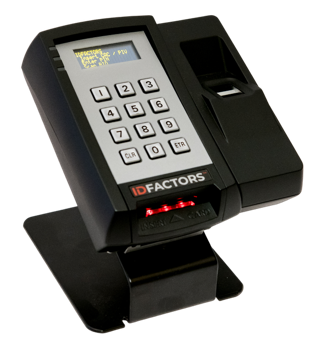
Set or change a PIN, and enroll a biometric with a compatible model.
A four-line OLED display on equipped models guides the operator and cardholder.
01 / Contact + Contactless
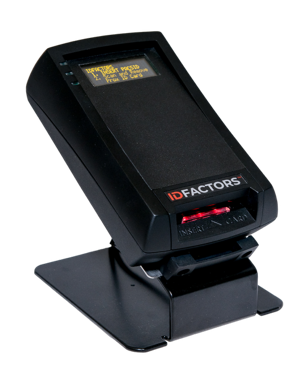
The 1-Factor contact and contactless Desktop Reader supports importing Prox and MIFARE card identifiers into the PKI certificates on TrustPoint PIV-C cards. This preserves credential-number continuity and enables cryptographic verification of the credential, while leaving the access-system database unchanged.
02 / Card + PIN
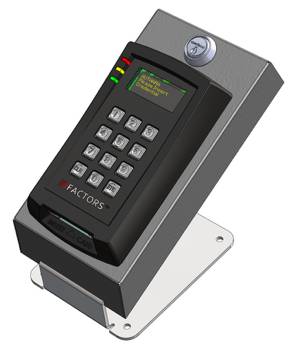
The 2-Factor dual-interface Desktop Reader supports PIN-to-Card or PIN-to-Panel operation for enrollment into legacy PACS. Vault configurations include an integrated steel vault that provides physical protection for the YubiHSM 2 used to sign certificates for newly created TrustPoint cards.
03 / Card + PIN + BIO
The 3-Factor dual-interface desktop reader adds a SecuGen biometric scanner. It combines contact and contactless card interfaces, a keypad and biometric capture in one desktop device.
Product selection
Choose the cardholder interfaces and hardware configuration your deployment needs. Only configurations with a Vault part number include the HSM Vault.
| Configuration | Interface | EntryPoint | TrustPoint + Prox & HVM | TrustPoint + Vault | TrustPoint + Prox & Vault |
|---|---|---|---|---|---|
| Dual Interface (No Keypad) | USB | 78-20-2002-XX | 78-20-2002-PC | 78-20-2002-XV | 78-20-2002-PV |
| Dual Interface + PIN | USB | 78-20-2003-XX | 78-20-2003-PC | 78-20-2003-XV | 78-20-2003-PV |
| Dual Interface + PIN + BIO | USB | 78-20-5003-XX | 78-20-5003-PC | 78-20-5003-XV | 78-20-5003-PV |
Protected signing hardware
Signing keys establish trust in digital certificates. Control of a private signing key allows its holder to issue signatures that relying systems may trust. Keeping that key in a Hardware Security Module (HSM) allows signing operations to take place inside protected hardware without exposing the private key to the workstation.
The desktop signing configuration uses a YubiHSM 2 to hold the CA signing key and sign certificates. The reader and YubiHSM 2 each connect to the Windows workstation through a separate USB cable.
Configurations with a Vault part number include a steel HSM Vault with a high-security keyed lock. The desktop stand can be bolted down for additional physical protection. The vault is not included with non-Vault configurations.
Protected Legacy Format
For compatible deployments, the TrustPoint desktop workflow can preserve the credential number your access system already recognizes while moving that identifier into a TrustPoint PIV-C card certificate. This allows the credential to change while the existing access-system identity is retained.
The desktop workflow reads a supported legacy card identifier, such as a Prox or MIFARE identifier, and includes it in the certificate created for the new TrustPoint PIV-C card. Authara guides credential creation and personalization.
A compatible authenticating reader verifies the new credential before passing its identifier to the access system. The access system continues to use that identifier to apply its existing access permissions. Existing door readers may need to be upgraded to support this verification.
When the credential number and PACS format are preserved, the existing cardholder records and permissions can remain in place. Confirm the mapping with IDFactors before rollout.
Confirm the source card technology, credential-number format, target card, reader configuration and PACS interface. Test the complete workflow with a small group of cards before planning a wider rollout.
Let’s find the right configuration
Tell us about your credentials, installation and access system. Our team can help with product selection, compatibility and pricing.
Contact salescustomerservice@idfactors.com